Can You Use ChatGPT to Track Client Bookings?

Booking admin often starts with small changes that arrive one by one.
A client changes the time. Another client pays part of the balance. Someone adds an extra service. Now that change has to go somewhere: a spreadsheet, a calendar, a booking app, a note, an invoice, or maybe several of them.
That is why ChatGPT can feel like the easier option. Instead of opening every tool yourself, you just tell it what happened. Paste the client message. Dictate the update. Ask it to adjust the booking, remember the payment, draft the reply, and tell you what is still left to do.
For a few bookings, this can feel surprisingly natural. You are not filling in fields or copying details between tools. You are just describing the work in normal language.
But then the obvious question appears: where is all of this actually stored? Can ChatGPT keep track of your booking workflow, your client records, and repeated updates as the work changes over time?
This article looks at what ChatGPT can do for booking management, what still has to happen around it, and where a simple chat-based setup starts to need a more reliable system.
Contents
- What Can ChatGPT Actually Do With Your Bookings?
- Can ChatGPT Remember All Your Bookings?
- What a ChatGPT Booking Management Setup Can Look Like
- How Do You Know ChatGPT Recorded the Right Thing?
- What Should a Booking Management Setup Handle?
- How AI-Assisted Booking Management Systems Handle Bookings
- So, Should You Use ChatGPT to Track Bookings?
What Can ChatGPT Actually Do With Your Bookings?
ChatGPT is useful because you can describe booking work in normal language. You do not have to start with a form, a table, or a special system. You can simply tell it what happened.
For example, you might write, “Anna booked next Tuesday at 2pm, paid a €100 deposit, balance due on the day.” ChatGPT can turn that into a clearer booking note.
You can also ask it to:
- summarize this week’s bookings;
- list clients who still need to pay;
- clean up a messy client message;
- draft confirmations, payment reminders, proposals, or polite follow-ups;
- rewrite a client message in your usual tone.
This fits how many small businesses actually work. A booking often changes through short updates: the client moved from Friday to Monday, paid the second half, added an extra hour, or needs a reminder. ChatGPT can help turn those updates into organized text.
This can feel like having an assistant. You ask what is happening tomorrow, then ask for confirmation messages, then ask which bookings are still unpaid. For small tasks, that can be genuinely useful.
But helping you work with booking information is not the same as being the safe place where the booking information lives. ChatGPT can help create, summarize, and rewrite booking details. The next question is whether it can reliably remember the exact version of those details later.
Can ChatGPT Remember All Your Bookings?
ChatGPT can remember some things, but that does not make it a reliable booking record.
Its memory is useful for general context. For example, it may remember what kind of business you run, how you like to speak to clients, or that you usually ask for a deposit before confirming a job. That can make future conversations easier because you do not have to explain the same background every time.
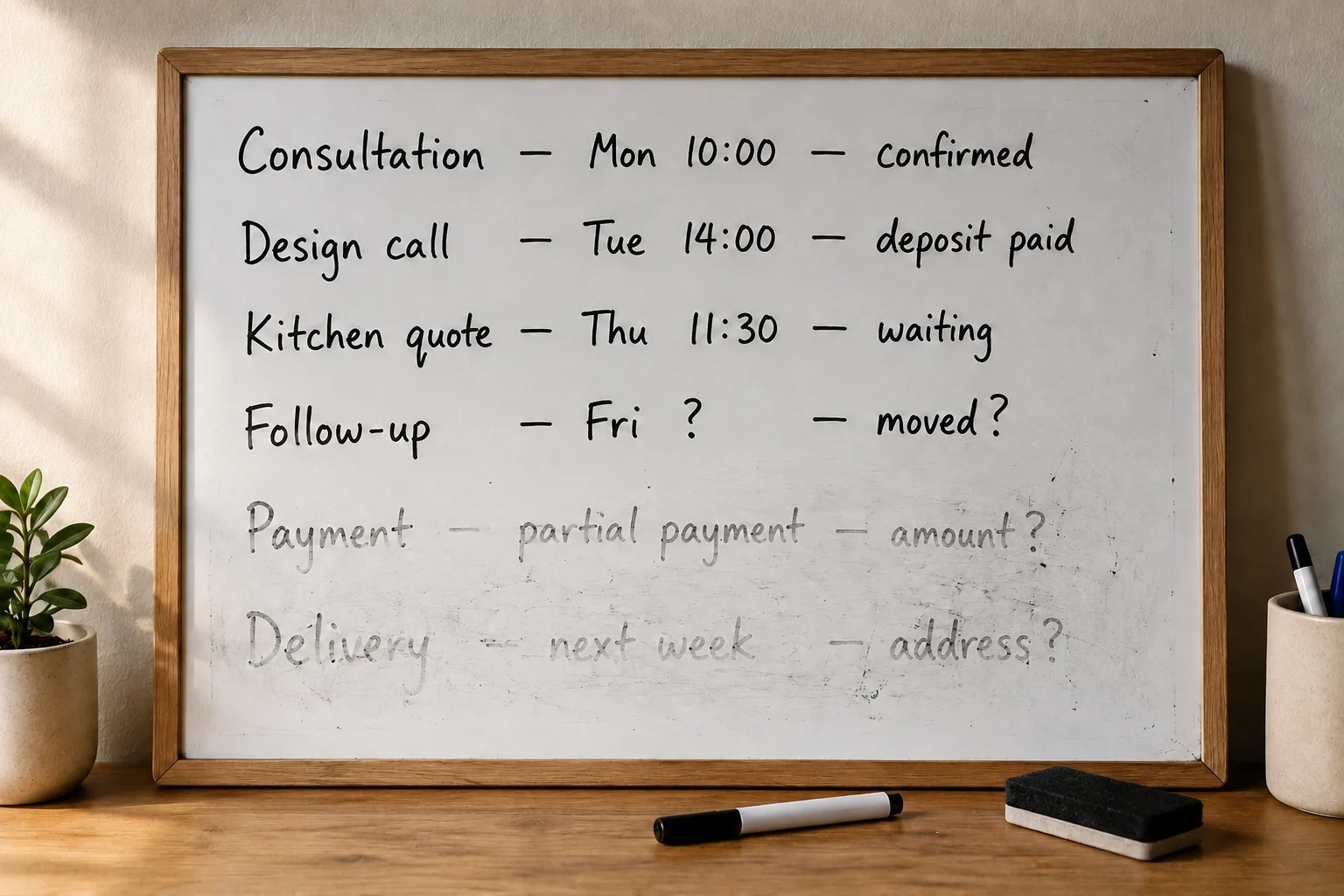
But booking details are different. A booking is not just background information. It may include a date, time, client name, price, deposit, remaining balance, location, delivery deadline, and later changes. Those details need to be exact.
This is where relying on ChatGPT alone becomes risky. You may tell it that a client moved from Friday to Monday, but later still need to know which date is now final. You may ask it to remember that someone paid €150, but you also need to know whether that was the deposit, the balance, or an extra payment. Small misunderstandings can create real problems.
Key distinction: “ChatGPT seems to remember this” is not the same as “this is the official record of the booking.”
For casual context, memory can be helpful. For appointments, payment balances, deadlines, and client commitments, you need a record you can open, check, and trust.
So ChatGPT memory can support the conversation around your bookings. It should not be treated as the place where all booking information permanently lives.
What a ChatGPT Booking Management Setup Can Look Like
A more reliable setup separates the chat from the booking record. ChatGPT can help you turn a client message into a clean booking entry, but that entry still needs to be saved somewhere you can open and check later.
The manual version
The basic way is manual. You ask ChatGPT to prepare the booking details, then copy them into Excel, Google Sheets, Airtable, or your calendar yourself.
For example, ChatGPT can format the record as:
- client name;
- date and time;
- service;
- price;
- deposit paid;
- balance due;
- notes.
Then you paste those details into your table. This is simple, but you are still doing the actual saving by hand.
The connected-tools version
The more useful way is to connect your tools directly to ChatGPT. As of August 2026, this usually means opening ChatGPT, going to the apps, connectors, or plugin area, and connecting the service you already use. For example, you may connect Airtable if your bookings are stored in an Airtable base, Google Drive if you use Google Sheets, Gmail if booking requests arrive by email, and Google Calendar if appointments need to appear on your calendar. On paid ChatGPT plans such as Plus, Pro, Business, or Enterprise, these connected tools are the first place to check, although exact availability can still depend on your region, account, and workspace settings.
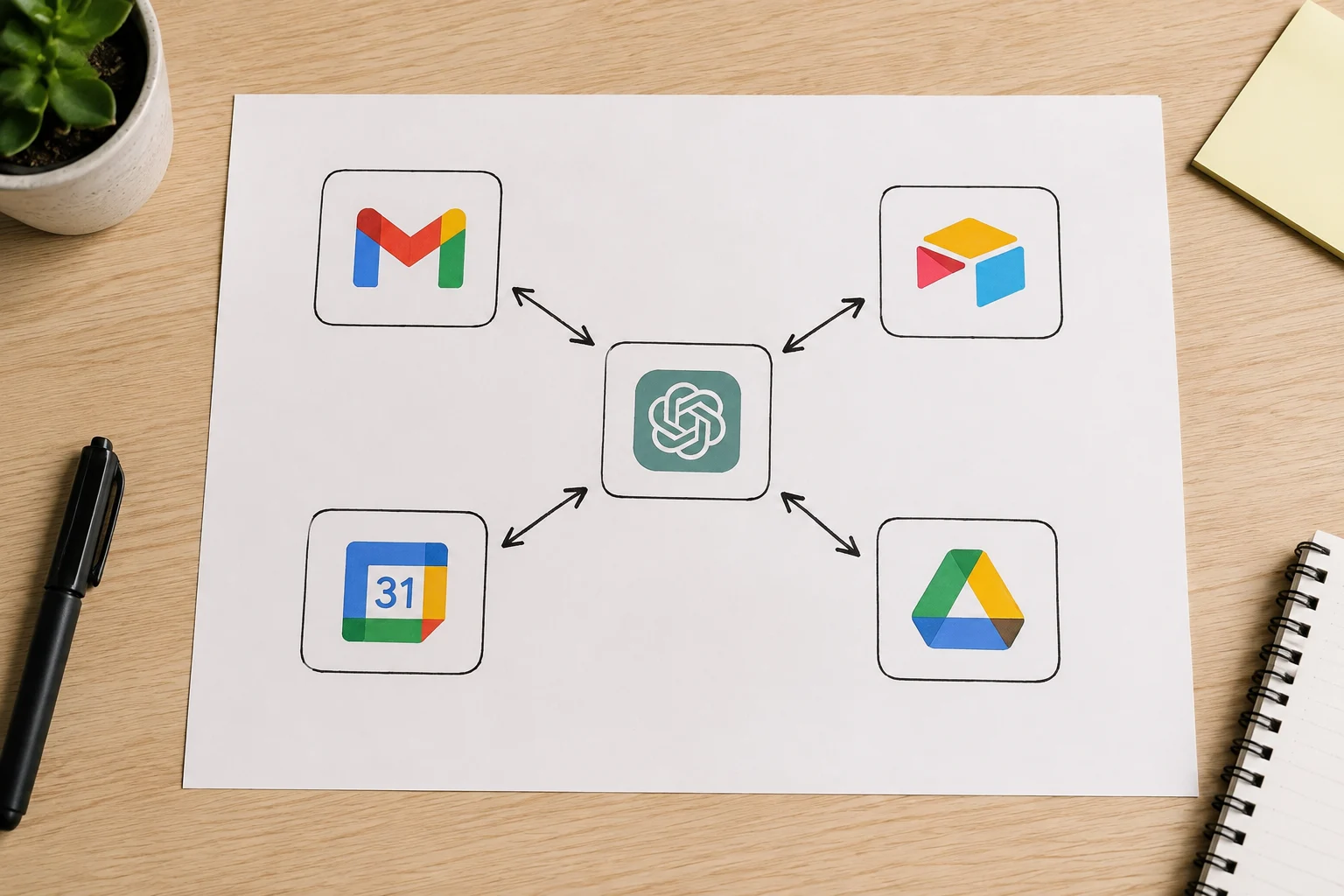
Airtable for ChatGPT is one example of this kind of connection. It is not just a general suggestion to “use Airtable.” It is an app or plugin inside ChatGPT that can connect ChatGPT to selected Airtable bases. After you connect it and choose the base ChatGPT is allowed to use, you can ask ChatGPT to work with that Airtable data from inside the chat.
A booking workflow could then look like this:
- A client emails you asking for next Tuesday at 2pm.
- You ask ChatGPT to turn that email into a booking record.
- ChatGPT prepares or adds the booking to your Airtable base or Google Sheet.
- It creates or suggests the appointment in Google Calendar.
- It drafts a confirmation email in Gmail.
Depending on the connected app and permissions, ChatGPT may be able to prepare or carry out those actions from the conversation instead of only giving you text to copy.
Obviously, this approach is much more convenient: instead of manually copying data and constantly switching between spreadsheets, calendars, and email, ChatGPT can work directly with the tools where your bookings, messages, and events already live. This reduces the number of errors and makes the whole process almost automatic.
You can also make this more custom with a custom GPT and actions, where the GPT is set up to follow your own booking workflow. But that is no longer just “using ChatGPT.” At that point, you are designing your own small booking system: deciding which tools connect, what ChatGPT is allowed to change, and how each booking update should be checked.
Before building our own system, we tried a similar setup with ChatGPT, Airtable, Google Calendar, and Gmail for sending client messages. In principle, it worked. ChatGPT could help prepare booking records, calendar updates, and emails. The setup showed that this kind of AI-assisted booking workflow is possible. It also showed the practical difficulties that appear once real bookings, payments, date changes, and client messages all need to stay correct.
How Do You Know ChatGPT Recorded the Right Thing?
The awkward part of a DIY ChatGPT setup starts after the exciting part. You connect Airtable, Google Sheets, Gmail, or Google Calendar, ask ChatGPT to add a booking, and it looks as if the admin work has disappeared.
But now the question is simple: did it add the right thing?

You can tell ChatGPT, “Always show me the booking before you save it.” That is a good rule to give it. The problem is that, in a self-made setup, this rule often lives as a chat instruction. It may be in the current conversation, in a custom GPT instruction, or in memory. That is still not the same as a booking system where approval is built into the workflow.
This matters because real booking messages are rarely perfectly clean. A client says “same time next week,” but there are two possible bookings. Someone pays €150, but it is not clear whether that is the deposit, the balance, or an extra charge. A date is written in a way that could be read differently depending on the country. ChatGPT may understand the message correctly most of the time, but “most of the time” is not enough when the result changes your calendar or payment records.
The dangerous part is that ChatGPT can make the process feel more certain than it really is. It gives a confident answer, the connected tool may accept the update, and the whole thing can look finished. But to be sure it worked, you still have to check the result yourself:
- the new row in Airtable or Google Sheets;
- the calendar event;
- the payment status;
- any email or confirmation that is going to the client.
That is the validation problem with a DIY setup: ChatGPT may save you some formatting and admin work, but if you have to verify every record manually, you are still doing a large part of the booking-management job yourself. And that leads to the next question: what exactly does a booking setup need to handle, so you are not checking scattered details one by one?
What Should a Booking Management Setup Handle?
Once you stop treating ChatGPT as the place where bookings live, the next question is what the real booking setup needs to keep track of.
At minimum, you need the client details, the current booking details, and the payment situation. That means:
- names;
- contact information;
- date and time;
- service;
- price;
- deposit;
- balance;
- status.
If a client changes the date, adds something to the job, or pays another part of the balance, the record needs to show the latest version clearly.
But booking work is not only about the booking itself. There may be:
- unfinished work to deliver;
- reminders to send;
- documents to prepare;
- follow-up messages to write.
A useful setup should make it easy to see what is booked, what is paid, what is still owed, and what still needs to be done.
The important thing is that all of this has to stay consistent. Your booking rules, offer templates, confirmation messages, payment terms, and normal workflow should not change just because a chat happened in a slightly different way. If you confirm jobs only after a deposit, the system should keep following that rule. If you use a specific style for client confirmations, it should not drift every time ChatGPT rewrites a message.
This is where a DIY ChatGPT setup can start to feel heavy. It is not enough to connect a table and a calendar. You also have to define the workflow around them: what counts as booked, what counts as paid, when a reminder should be sent, what message should go to the client, and where unfinished work is tracked.
That is why the problem is bigger than “Can ChatGPT add a row to Airtable?” A booking setup has to hold the full shape of the work, not just one isolated update. Once those pieces have to stay together, the question becomes less about using ChatGPT as a tracker and more about having a booking system that already knows how the work should run.
How AI-Assisted Booking Management Systems Handle Bookings
In a DIY ChatGPT setup, ChatGPT often has to hold too much of the workflow in the conversation. It reads your instruction, works with Airtable or Google Sheets, checks the calendar, drafts the email, and tries to follow the rules you gave it. That can work, but many important decisions are still happening inside the chat.
The more the chat grows, the higher the chance that ChatGPT’s context gets compressed, which can lead to important details of your workflow being lost.
By “system,” we mean something more fixed: a clear step-by-step flow that the product follows every time:
- Collect the booking details.
- Check what is missing.
- Show the proposed update.
- Wait for the user to confirm.
- Save the booking.
- Prepare the client message or calendar update if needed.
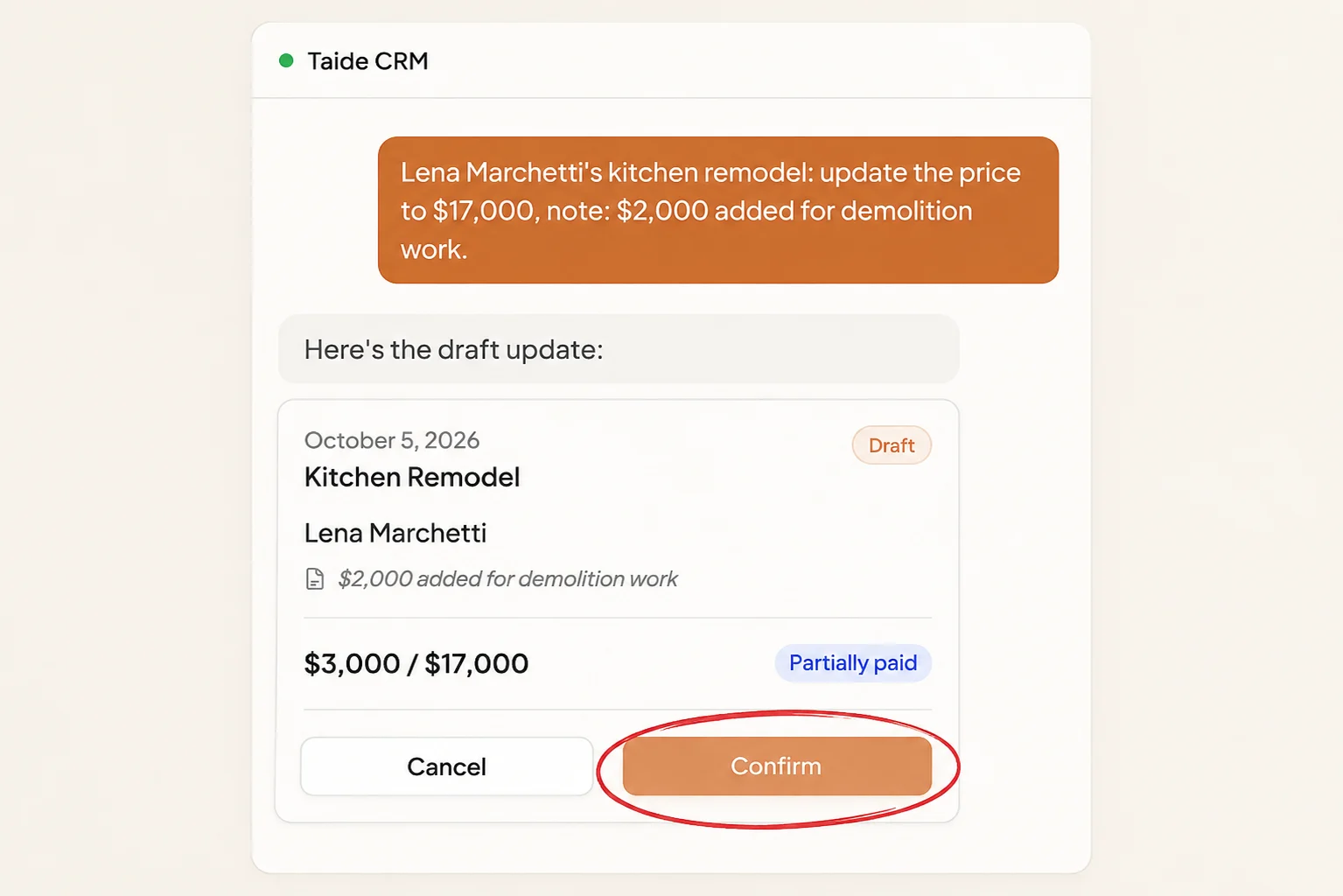
Those steps are built into the product. They are not just a reminder in ChatGPT’s memory or a rule written somewhere in a long conversation. The AI can read the message, understand what the user wants, fill in the details, and suggest the update. The important steps still follow the same reliable process.
The system uses AI to help the user, instead of relying on AI to hold the whole workflow together.
Taide was built around this pattern. It uses AI to understand the user’s intent and make commands easier to give in normal language. Underneath, the booking structure, payment and delivery tracking, calendar connection, message workflow, and confirmation step still follow a fixed process.
This is not about inventing a completely new way to manage bookings. It is about putting AI on top of a reliable workflow. The user gets a faster and easier experience, while the system keeps the important steps in place: what has to be saved, what has to be checked, and what needs confirmation before it becomes final.
That brings the question back to the practical answer: ChatGPT can be useful for booking work, but it should not be the only place where real bookings are managed.
So, Should You Use ChatGPT to Track Bookings?
Yes, it can make booking admin easier. If you are comfortable letting ChatGPT make updates and regularly checking what it actually saved, sent to a client, or added to your calendar, this kind of setup can work. You can also spend more time configuring ChatGPT to follow a workflow and ask for confirmation at the right points.
The real cost is the time required to build and supervise the setup. You need to connect the services, explain your rules, test the actions, maintain the instructions, and check important results. That effort may be worth it if you want a custom workflow and are comfortable looking after it.
Use ChatGPT if you are comfortable building, testing, and checking your own setup.
Use a booking system if you want the workflow, records, and confirmation steps to already be built in.
Otherwise, you can use a ready-made booking system where the workflow and checks are already built in. The choice comes down to how you want to spend your time: building and checking your own ChatGPT setup, or using a system that has already been prepared for this work.