When Do You Need a Simple Customer and Bookings App?

You need a simple customer and bookings app when the record you normally check no longer tells you the full state of a job. The usual sign is that you open the booking and then have to look somewhere else because the latest change was never added to it.
We saw this while building Taide from conversations with photographers. Recording the first booking was rarely the difficult part. Problems appeared later, after the client changed something and the update did not make it into the place they normally checked.
The same thing happens in other small service businesses. It is worth fixing before it causes a missed appointment or an unpaid job, because by then the admin has usually been wasting time for months.
How the problem develops
Most booking setups grow gradually.
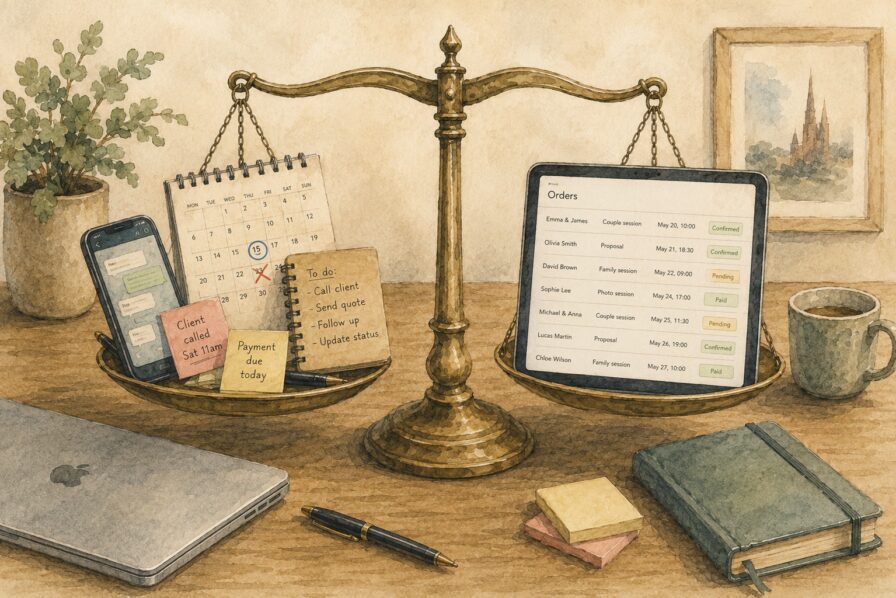
At first, a calendar may be all you need. The client conversation stays in WhatsApp or email because that is where the details were agreed. Later, when deposits become harder to follow, you add a spreadsheet.
There is nothing unusual about this setup. Each tool was added because it solved a problem at the time.
The trouble begins when the booking changes.
Imagine the client moves an appointment in WhatsApp. The conversation now has the correct date, while the calendar still has the old one. Until somebody updates the calendar, there are two versions of the same booking.
You may remember which one is right. With a small number of jobs, that can work for a long time.
As the business gets busier, remembering the differences becomes part of running it. Before answering a client, you start checking whether the record in front of you is still current.

A simple test for your current setup
Take one active booking and try to answer these questions without opening another app:
- What exactly has the client booked, and when?
- How much have they paid, and how much is still due?
- Is there anything you still need to send or complete?
If the answers are already in one place, your setup is doing its job.
If the date comes from the calendar but you need the chat for the latest change, the booking is already incomplete. The same applies when payment is tracked elsewhere or you rely on a note to remember what still needs to be delivered.
Try the exercise with several current jobs. You are looking for a pattern: which questions repeatedly make you leave the booking and search somewhere else?
That tells you what the new system actually needs to fix. It is more useful than choosing software from a feature list.
Why updates get missed
Most updates arrive while you are doing something else.
A photographer may be finishing a shoot when the client asks to change the delivery date. Someone may pay a deposit while you are travelling. You read the message, understand what changed and continue with the work in front of you.
The booking can be updated later, so that is what happens.
The problem is that later has its own work waiting. By the time you return to the booking, you may have another client message to answer or another job to prepare.

Research on task switching helps explain why these loose ends can stay in our attention. Sophie Leroy found that people can carry some attention from an unfinished task into the next one, which she described as attention residue.
E. J. Masicampo and Roy Baumeister studied unfinished goals and found that making a specific plan could reduce the intrusive thoughts and interference associated with them. Their study is available through PubMed.
A booking update is obviously a much smaller task than many of those studied in the research, but the practical lesson is useful: leaving something unfinished means you still have to keep track of it.
For booking admin, the easiest way to reduce that gap is to make the update possible when the information arrives.
What one booking record needs to contain
Do not begin by copying every field from every tool you currently use.
Begin with the questions you need the booking to answer.
For most small service businesses, the useful record includes the client, the current agreement, the money and what happens next.
That means you should be able to open the booking and see the current date, the service or project, the agreed price and what has already been paid. Any important change should be recorded there as well.
The last part is easy to overlook: what still needs to happen?
For a photographer, the appointment may be finished while the edited files are still waiting for delivery. A consultant may have completed the meeting while a report remains due. The booking is still useful after the scheduled work has happened.
This is why a calendar alone often stops being enough. It tells you when something is happening very well; it does not necessarily tell you whether the whole job is finished.
How to judge a booking system
The best way to evaluate booking software is to try the boring tasks you will repeat every week.
Use your phone and:
- Add a new booking.
- Change something in an existing booking.
- Record a payment.
- Find the jobs that still need attention.
Pay attention to how much effort each task takes.
If changing a date involves opening several screens and editing a long form, you are likely to keep leaving quick changes in the message thread. If recording a payment takes longer than writing it into the spreadsheet you already use, the spreadsheet will probably survive beside the new system.
That leaves you with the same problem you started with.
For a small service business, software earns its place when the everyday updates are easy enough that the main record actually stays current.
You should also check whether the software matches the way the business works. If the normal flow is booking, work, payment and delivery, spend your evaluation time on those jobs rather than features built for a sales process you do not use.
How Taide handles the same problem
This is the part of the workflow we focused on when building Taide.
Taide keeps the booking details, payments and delivery status on the same job. A booking can be added or updated through chat, voice or a short form. With a chat update, Taide shows the proposed change before it is confirmed.
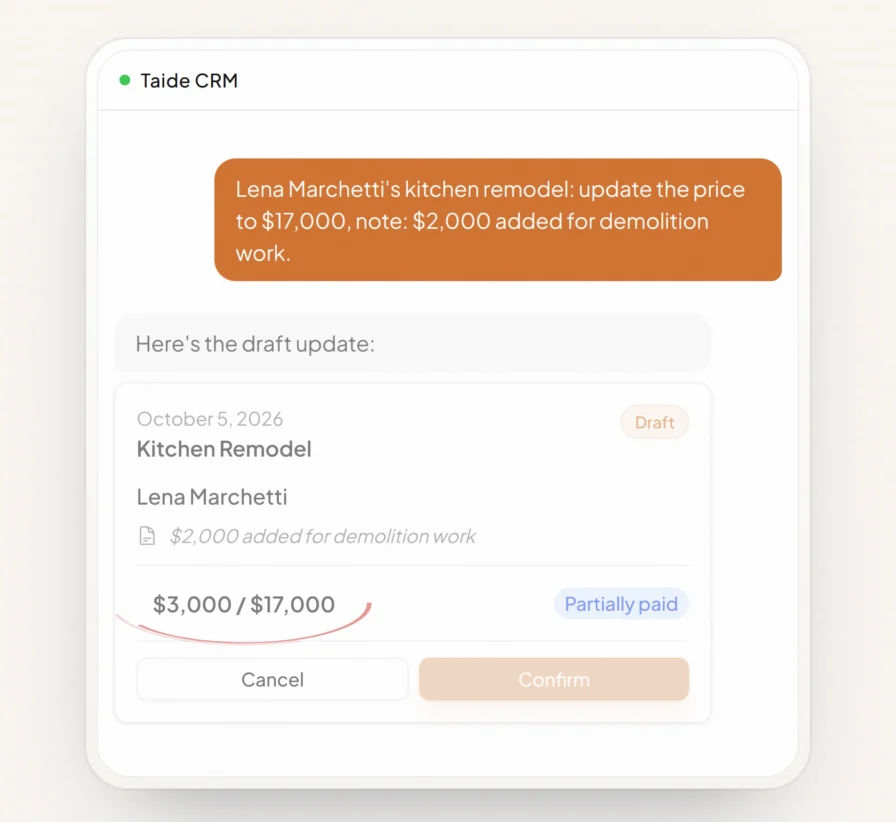
For example, if the price changes, you can write the update while it is still fresh. Taide shows which booking it is changing and what the new values will be. Once you confirm it, the payment balance is updated with the booking.
The same system can record a payment or mark completed work as delivered. The bookings view also shows upcoming work and payment information, so these jobs can be found without rebuilding the story from old messages.
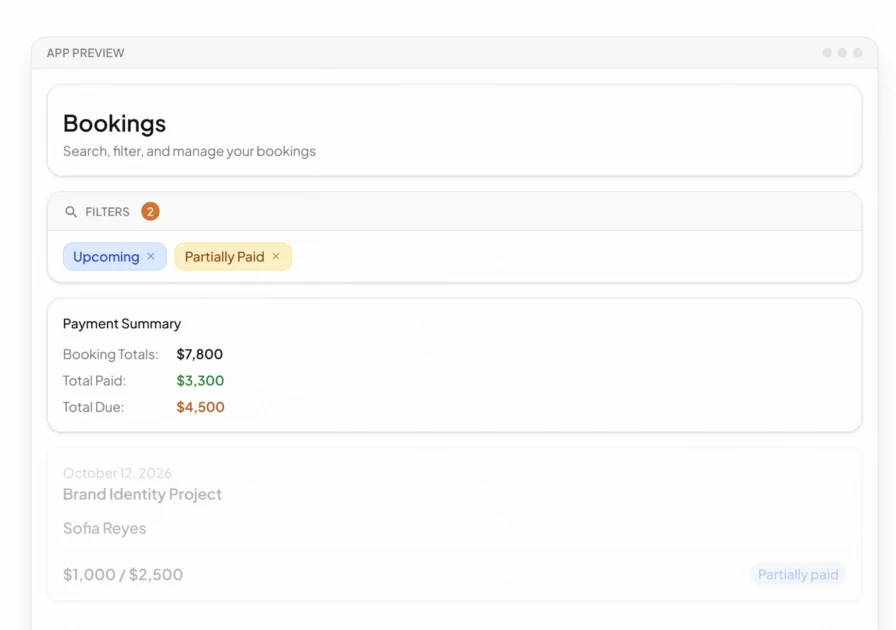
That focus came from the problems we were seeing among freelancers and small service businesses: the individual pieces of information already existed, but keeping the working record current took too much effort. Taide was built around making that update easier. You can read more about why we built Taide CRM.
Moving over without a big migration
You do not need to rebuild years of client history before using a new booking system.
Start with the work that is still active.
Choose a day when the new system becomes the record you update first. Add the current bookings and make sure each one contains enough information to answer the questions from earlier in this article.
Old messages and spreadsheets can stay where they are for reference. The important part is what happens after the switch: when an active booking changes, update the new record instead of maintaining another version somewhere else.
After a week or two, run the same test again.
Open a booking and check whether you can see what was agreed, what has been paid and what still needs to happen without searching somewhere else.
If you can, the new setup is doing useful work.